

By TastyPot Editorial Team. Last reviewed September 3, 2026.
A same-day delivery menu should help you decide, not make every product feel urgent. The simplest way to compare weed delivery menus is to start with five checks: delivery fit, menu freshness, product format, listing detail and cart confidence.
This guide is for adult shoppers in Kitchener, Waterloo, Cambridge, Guelph and the surrounding Waterloo Region who want a calmer way to choose. It will not tell you what to buy. It will show you how to compare a menu without getting pulled around by every badge, promo or product name.
For local context, start with Tasty Pot Delivery. When you are ready to compare current products, use the live shop menu. If a delivery or checkout detail is unclear, check the ordering help page before placing an order.
Quick answer: Shortlist by delivery area first, then compare product categories, available sizes, flavour and aroma notes, current stock signals, cart details and support options. A smaller menu with clear product information is often easier to shop than a huge menu with vague descriptions.
How Should You Check Delivery Fit First?
The first comparison is not flower versus vape, or sale item versus regular item. It is whether the menu actually fits your order. Look for service area language, checkout availability, cart messages and support links before you spend time comparing products.
A menu can look impressive and still be a poor fit if the delivery context is unclear. Check whether the site speaks directly to your city or area, whether the shop and cart feel current, and whether there is an obvious path to help if something does not make sense.
For Tasty Pot shoppers, the homepage acts as the regional starting point, while the shop is the source for current menu items. The help page supports checkout questions. Keep those roles separate: homepage for service context, shop for current products, help for ordering details.
Which Product Format Should You Compare First?
Once the menu fits your location, choose the product format before comparing individual listings. Formats are easier to compare than product names because they reflect how the item is packaged and used: flower, pre-rolls, vapes, edibles, concentrates, accessories or current deals.
This is where overwhelm usually starts. Shoppers open a menu, see dozens of names, then try to compare everything at once. A cleaner method is to ask, “What format am I shopping today?” If the answer is flower, compare flower pages and product cards. If the answer is vapes, compare cartridge or disposable details.
Format filtering also helps you avoid false comparisons. A flower listing, a vape listing and an edible listing may all appear in the same menu, but they are not interchangeable. Compare like with like first, then decide whether a second format belongs in the same cart.
What Menu Freshness Signals Matter?
A useful same-day menu should feel current. You are looking for product cards, prices, variants, stock or availability signals, category pages and cart behavior that agree with one another. If one part of the page says one thing and another part says something different, slow down.
Freshness is not just about new products. It is about whether the menu gives you enough confidence to act today. Product pages should show the format, available options, product category, image, short description and any current selection controls. Category pages should make it easy to move between related formats without losing your place.

Be careful with stale cues. Old seasonal language, outdated promos, mismatched locations, glitchy interface text or product descriptions that read copied from a strain database can all make comparison harder. They do not always mean the product is unavailable, but they do mean you should rely on live product options and checkout details instead of old copy.
How Do You Read Product Details Without Chasing Claims?
Good product comparison does not need hype. The most useful details are practical: format, weight or size, listed category, appearance, aroma, flavour, texture, packaging, storage notes, compatibility and current options. Those details help you compare products without drifting into unsupported claims.
For flower, compare category, listed profile, size options, visual description, flavour and aroma notes. For vapes, compare cartridge versus disposable format, hardware compatibility, flavour notes and current options. For edibles, compare format, package type and product listing details shown on the menu. For concentrates, compare format, texture, packaging and current variant choices.
Avoid making a decision from a single label. Names can be fun, but names are not a comparison framework. Two products can have similar names and different formats, sizes or listing details. Two products can also sit in the same category but have different flavour notes, package options or sale structures.
How Do You Build a Two-Minute Shortlist?
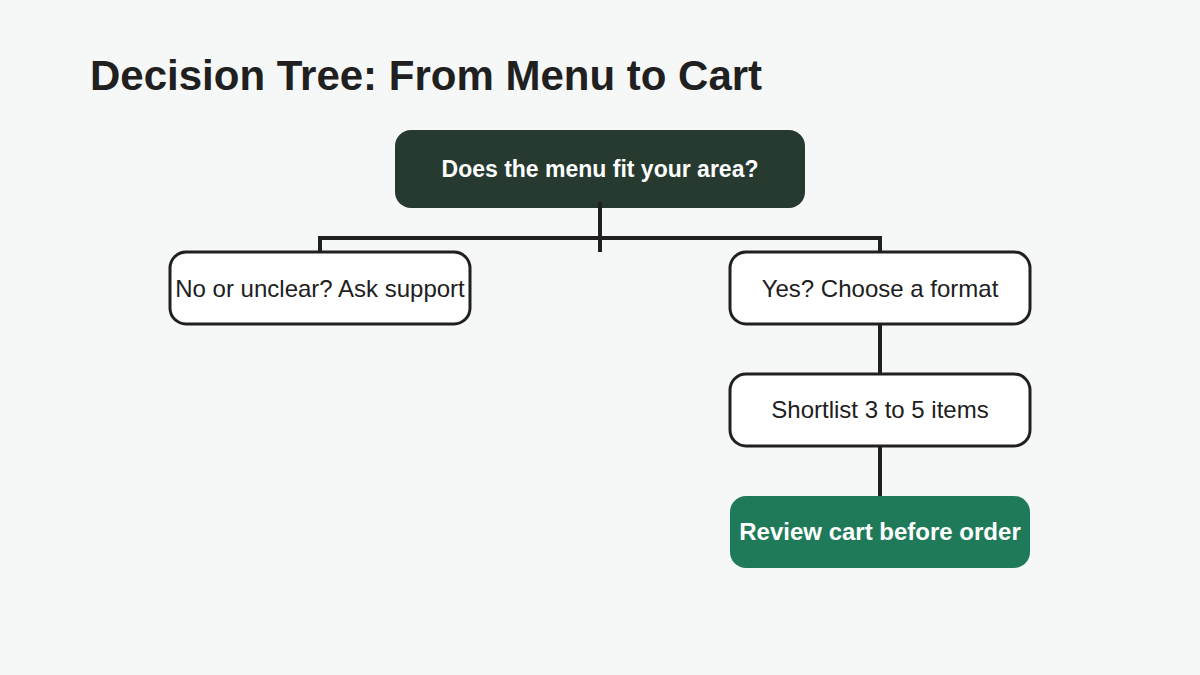
A shortlist keeps the menu from turning into an endless scroll. Pick three to five candidates inside one format, then compare them side by side using the same criteria. Do not keep adding products just because the menu is large.
Use this quick sequence:
- Choose one format. Flower, vapes, edibles, concentrates or deals.
- Remove poor fits. Skip anything with unclear options or a mismatch for your order.
- Compare useful details. Look at size, format, flavour or aroma, price shown on the page and current options.
- Check cart confidence. Make sure the selected variant and cart details match what you intended.
- Use support when needed. If something is unclear, ask before completing checkout.
This method works because it keeps the decision small. You are not ranking the entire store. You are choosing the best fit from a focused group.
What Should You Check in the Cart?
The cart is the final comparison point because it shows whether your choices still make sense together. Review the selected products, variants, quantities, cart total, delivery information and any checkout messages before placing an order.
This is especially important when comparing deals or multi-item carts. A product card may look simple, but the cart confirms what you actually selected. If the cart does not match your expectation, go back to the product page and adjust the option rather than guessing.
Use the cart as a calm pause, not an afterthought. A good checkout review catches wrong sizes, duplicate items, unclear variants and products that do not belong in the order. It also gives you one last chance to use the help page if delivery, payment or support details need clarification.
Common Menu-Comparison Mistakes
Comparing every category at once. This creates noise fast. Pick one format first, then compare products inside that format.
Choosing only by the loudest promo. A deal can be useful, but it still needs clear product details, current options and cart confirmation.
Ignoring stale or confusing copy. If a product page contains old, copied or inconsistent wording, rely on the live options and ask support when needed.
Skipping the cart review. The cart is where selected variants, quantities and order details come together. Review it before checkout.

FAQ
What is a simple way to compare weed delivery menus?
Start with delivery fit, then choose one product format and compare only three to five candidates. This keeps the decision focused and prevents the whole menu from becoming one giant comparison.
Should I compare by price first?
Price matters, but it should not be the only first filter. Compare format, current options, size, product details and cart fit alongside price so you know what the listed value actually includes.
How do I know whether a menu is current?
Look for product cards, variants, stock or availability signals, category pages and cart details that agree with each other. If something looks outdated or conflicting, use the live product options and ask support before ordering.
Can a smaller delivery menu be better than a larger one?
Yes. A smaller menu with clear categories, current product options and useful descriptions can be easier to shop than a larger menu with vague listings or confusing copy.
What should I do if two products look similar?
Compare the practical details: format, size, listed category, flavour or aroma notes, current options and cart behavior. If they still look too similar, choose the one with clearer information.
Compare a Live Menu With Less Guesswork
Use this framework the next time you shop: confirm service fit, choose a format, shortlist a few products, read practical details and review the cart. When you are ready, browse the current Tasty Pot menu and keep the Help page open for ordering questions.



One comment
Pingback:
Indica vs Sativa vs Hybrid: No-Hype Guide